Connect
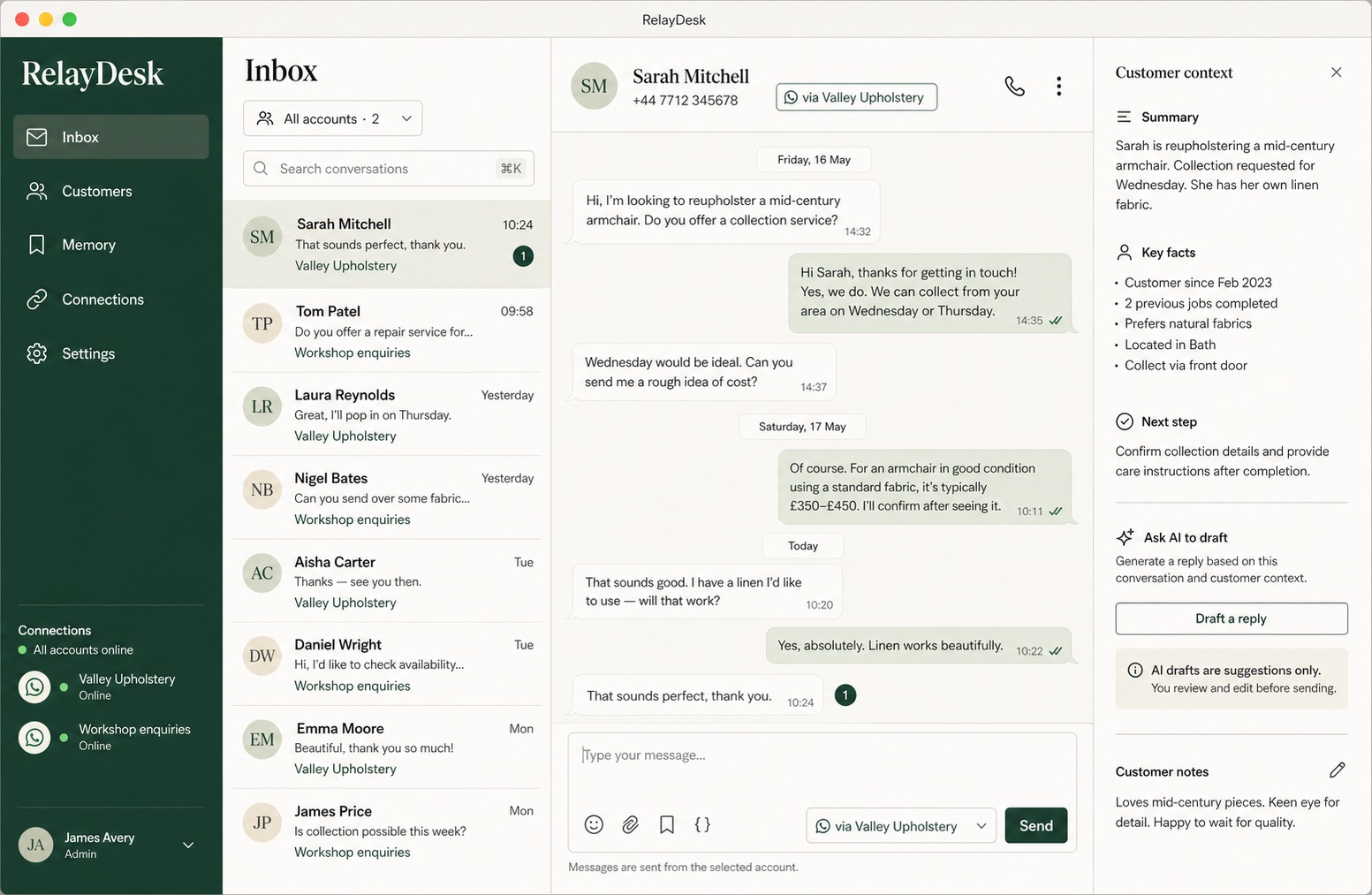
Keeps multiple linked WhatsApp accounts separate and visible in one inbox
02 // Mac preview
A local-first desktop customer inbox for businesses that work through WhatsApp, with multiple accounts, reviewable memory, human-approved AI drafts and optional MCP access. Your team stays in control of every reply and every sending account.
The working problem
When quotes, bookings, follow-ups and support all arrive through WhatsApp, the work quickly becomes harder than the chat itself. Context sits with one person. Separate business numbers are easy to mix up. Useful details disappear back into old conversations.
RelayDesk turns that stream into a desktop workflow: search every conversation, see which account a customer contacted, keep the relevant facts beside the thread and prepare a reply without losing the human decision at the end.
Connect // understand // draft // approve
RelayDesk is designed to help a person answer well, not to impersonate the business unattended. Account selection, learned facts and the final send action remain explicit.
Keeps multiple linked WhatsApp accounts separate and visible in one inbox
Builds drafts from recent conversation context and facts the owner has approved
Requires a person to review, edit and explicitly send every AI-assisted reply
Connects selected accounts to Codex, Claude Desktop and other local MCP clients
Reviewable memory
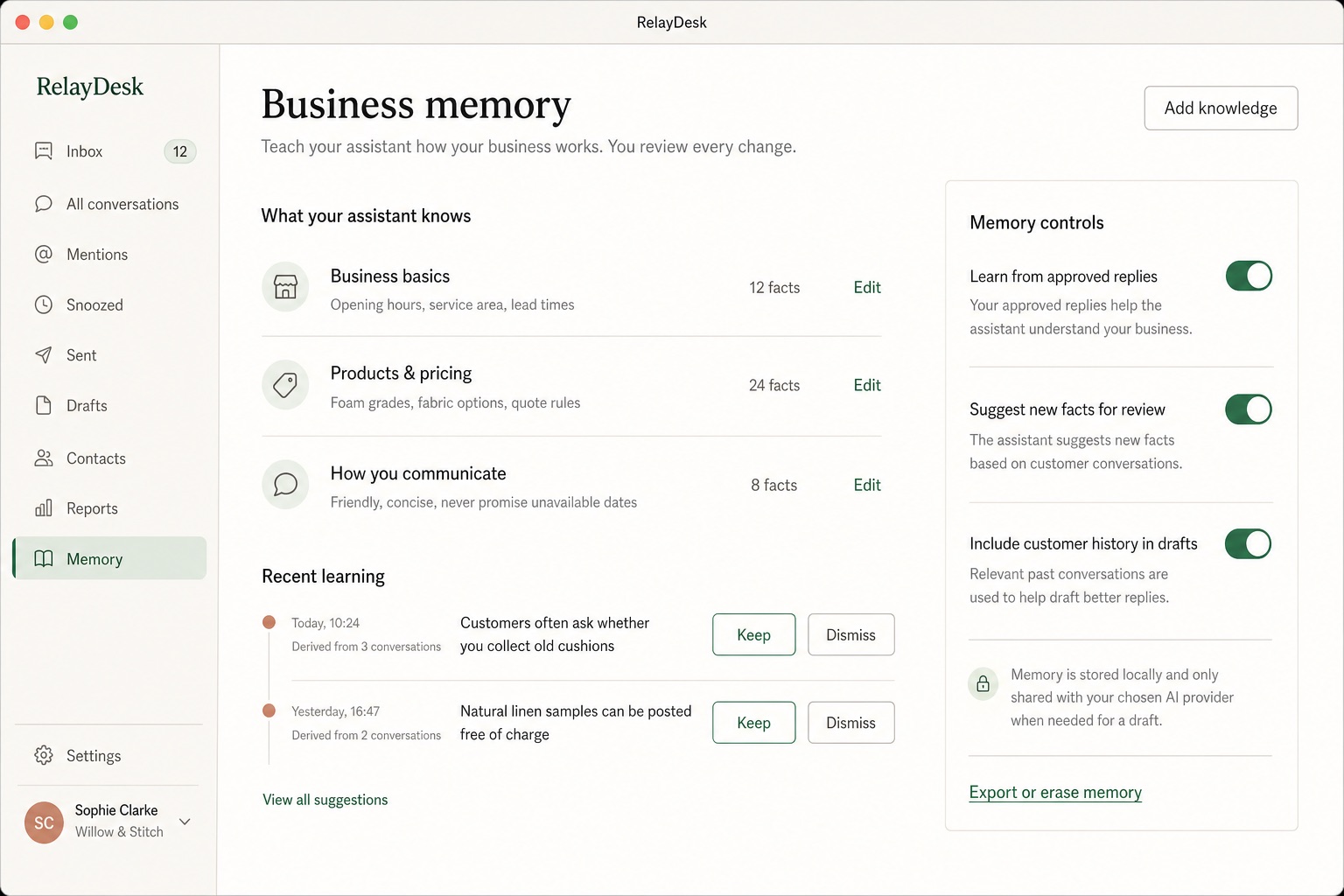
Keep business basics, products, pricing rules and communication preferences in a memory you can inspect. RelayDesk can suggest a new fact after an approved reply, but it becomes durable knowledge only when you choose to keep it.
Use your chosen AI
RelayDesk supports OpenAI, Anthropic, Google Gemini and configurable OpenAI-compatible endpoints. Provider credentials are encrypted through the operating system secure store and are not exposed back to the interface after saving.
The built-in local MCP connection generates configuration for Codex, Claude Desktop and other compatible clients. You decide which WhatsApp accounts are exposed, and sending always requires an explicit account so two businesses cannot be mixed up implicitly.
Local-first boundaries
Each linked account has its own session, message archive, bridge process and local access token. Business memory is separated by both WhatsApp account and customer, so the same person contacting two businesses does not merge those records.
RelayDesk uses a WhatsApp linked-device connection. It is not the official WhatsApp Business Platform and is not endorsed by or affiliated with WhatsApp or Meta. Platform behaviour and terms can change, so the preview is offered with that boundary made explicit.
Mac preview
The Apple-silicon macOS build is complete and is now being prepared for controlled distribution. It will not be labelled as a public installer until signing, notarisation and the release checks are complete. Windows and Linux packages remain future targets.
Questions
RelayDesk is a local-first desktop customer inbox for businesses that use WhatsApp. It brings multiple linked accounts, customer context, reviewed memory and AI-assisted reply drafting into one workspace.
No. AI drafts are suggestions. A person reviews and can edit the text before choosing to send it from an explicitly selected WhatsApp account.
The linked-device message archive and RelayDesk memory stay on the computer. Supported AI provider keys are protected by the operating system secure store. Relevant context is sent to the selected provider only when it is needed for a draft.
Yes. RelayDesk includes a local MCP connection for Codex, Claude Desktop and other compatible clients. The owner chooses which linked accounts those tools may access.
No. RelayDesk is made by MadeVia.ai and uses a linked-device connection. It is not endorsed by, affiliated with or an official product of WhatsApp or Meta.
An Apple-silicon macOS preview is being prepared for controlled distribution. Public Windows and Linux installers are not currently published.